
Run the whole floor from one platform.
Receive, diagnose, erase, grade, certify and report — on iOS, Android, Mac and PC, from the same bench, under one workflow. Built inside a high-volume refurbishment operation, not a lab.
- devices processed annually
- 12M+devices processed annually
- installs in the field
- 800+installs in the field
- platform uptime
- 99.99%platform uptime
Cycle count 184 · 94%
14 networks · −48 dBm
32 GB DDR4
2 drives · NVMe
devices processed annually on this platform.
Not a projection — production throughput, sustained since 2010.
ADISA
Pro-Diagnostics and MacRestore are certified to ADISA assurance level 4, valid to 2029.
NIST 800-88 Rev. 2
Clear and Purge methods, selected per drive and recorded on the erase report.
IEEE 2883
Sanitisation terminology and verification aligned to the current standard.
Sampled verification
Up to 4,096 read-back points across the disk. An unverified drive fails — it never passes.
We didn’t build this in a lab. We built it on the production floor.
Asset Science was built inside one of North America’s largest refurbishment operations, and then run there for years under real volume. Every feature on this platform exists because somebody on a bench needed it and said so.
That is an unusual way to build software and it shows up in unglamorous places: the scan box that keeps focus so an operator never types into a button, the 0.3-second guard that stops a twitchy scanner creating duplicate rows, the walkaway mode for the tests nobody wants to stand and watch.
It shows up in the architecture too. There are more than 800 installs in the field that cannot be force-updated, so the platform is built to keep them working — newer label formats are hidden from older clients rather than breaking their print queue.
Those details are not in a specification anywhere. They come from standing on the floor.
- Operating since
- 2010Operating since
- Devices per year
- 12M+Devices per year
- Platform modules
- 27Platform modules
- Platform uptime
- 99.99%Platform uptime
- Operator languages
- 7Operator languages
- Pieces of proprietary hardware
- 0Pieces of proprietary hardware
- Installs in the field
- 800+Installs in the field
- Identifier types accepted
- 10Identifier types accepted
Designed by people who had to stand at the bench.
A scan station is judged on whether it keeps up with an operator who is not looking at the screen. Here is what that actually requires.
The box keeps focus
Clears after every scan and takes focus back from any click that was not into a text field. The operator never types the next device into a button.
Banner, flash and tone
Green for pass, red for fail, amber for anything that could not be answered — plus an optional half-second screen wash and a tone, so the result lands without looking up.
Double-trigger guard
The same code inside 0.3 seconds is ignored, so a scanner that fires twice still produces exactly one row.
Placeholder codes rejected
Under four characters, or one repeated character, is refused before lookup rather than recorded as a device.
Three lookups at once
Faster scanning queues, and rows still arrive in scan order. A lookup that passes ten seconds goes to Failed scans to be re-run, not lost.
Failed scans are a worklist
Anything that did not resolve collects in its own card with the reason, and exports for investigation instead of disappearing.
Scan any of these
- IMEI
- IMEI2
- Serial
- MEID
- Wi-Fi MAC
- Bluetooth MAC
- ECID
- GUID
- ICCID
- Session ID
A 14-digit IMEI also matches its 15-digit form, and the reverse. Session IDs are the SE- codes printed on your intake labels.
Batch instead of one at a time
Drop in a CSV of up to 30,000 identifiers and the station answers the whole list against the screen you have selected. Results export, with your own column layout saved as a profile per station.
One screen, one question
Every time a device passes a station the platform keeps that visit. Each screen asks a different question of the device’s history — last process run, data clearing, diagnostics — and answers from the one visit that is relevant. Supervisors check a device before it ships from the same station.
One pipeline, from the loading dock to the marketplace.
Receiving, diagnostics, erasure, grading and certification are not six tools that exchange spreadsheets. They are one record, moving through one workflow, on one platform.
Receive
Scan the batch label. Operator, program, bench and shift come from the station config.
Device on recordDiagnose
Automatic tests start immediately and keep running in the background while manual tests proceed.
Pass · Fail · N/A per testErase
Method selected per drive, then read back and verified before anything is called done.
Erased and verifiedGrade
Cosmetic grade applied against your own scale, with operator audits sampling the result.
A · B · C · D · TBGCertify
Erase report and device record written, asset label printed at the bench.
Report + labelReport
Everything lands in Control Center, and leaves again by CSV or API on any plan.
Your systems
The interesting part is what happens when it doesn’t go straight through.
A clean pass is easy. A platform earns its place on the floor by what it does with the exceptions.
- Test fails
- Operator picks a reason from a controlled list. Supervisor override is recorded against the record, never silent.
- Drive will not verify
- The erase is a failure, not a pass. The controller reporting success is not accepted as evidence.
- Station goes offline
- The run continues locally and the record queues, then sends when the link returns. The floor does not stop.
- Nobody at the bench
- Walkaway mode runs the unattended tests to completion so the operator can work another device.
Six stages, one record, one platform.
A device arrives, and everything that happens to it afterwards is written to the same record. These are the actual screens, not an illustration of them.
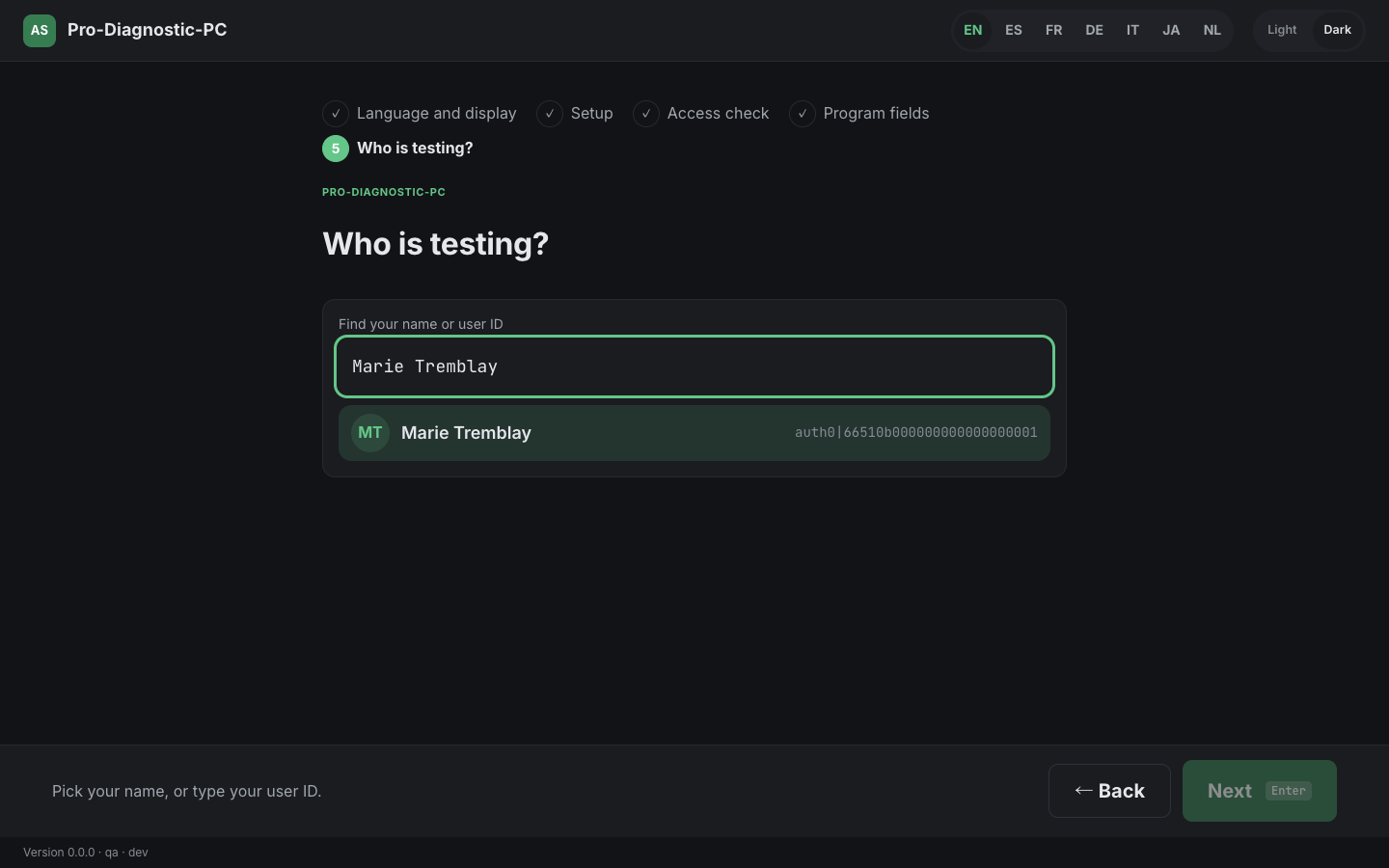
Scan the batch label and the bench knows the rest.
The operator picks their name or types a user ID. Batch, PO and pallet come off the label. Program, team and shift come from the bench configuration — nobody retypes them, so nobody mistypes them.
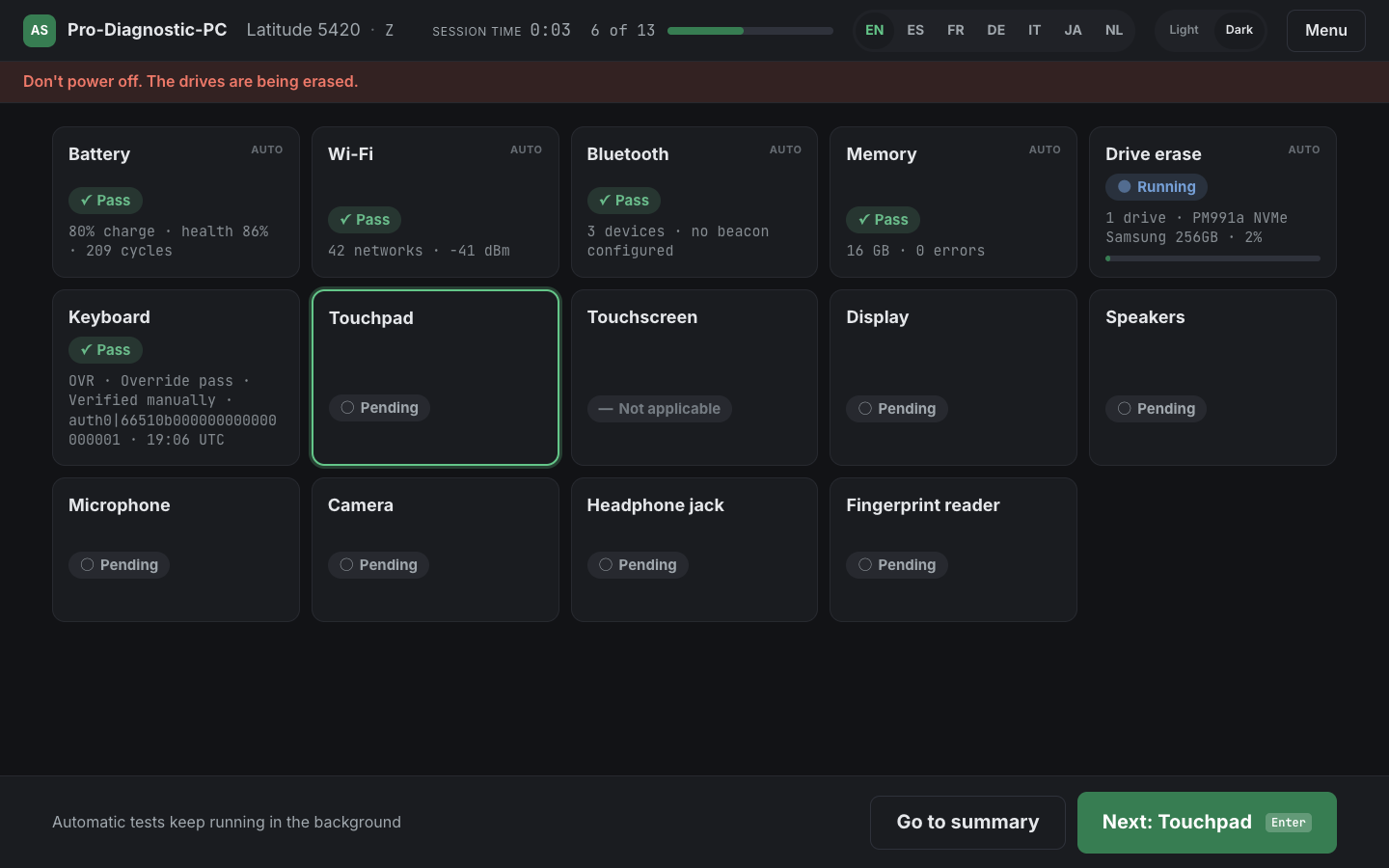
Automatic tests run while the operator works.
Battery, Wi-Fi, Bluetooth, RAM and drive erase start on their own and keep going in the background. The operator works through the guided tests — keyboard, display, speakers, camera — without waiting on any of them.
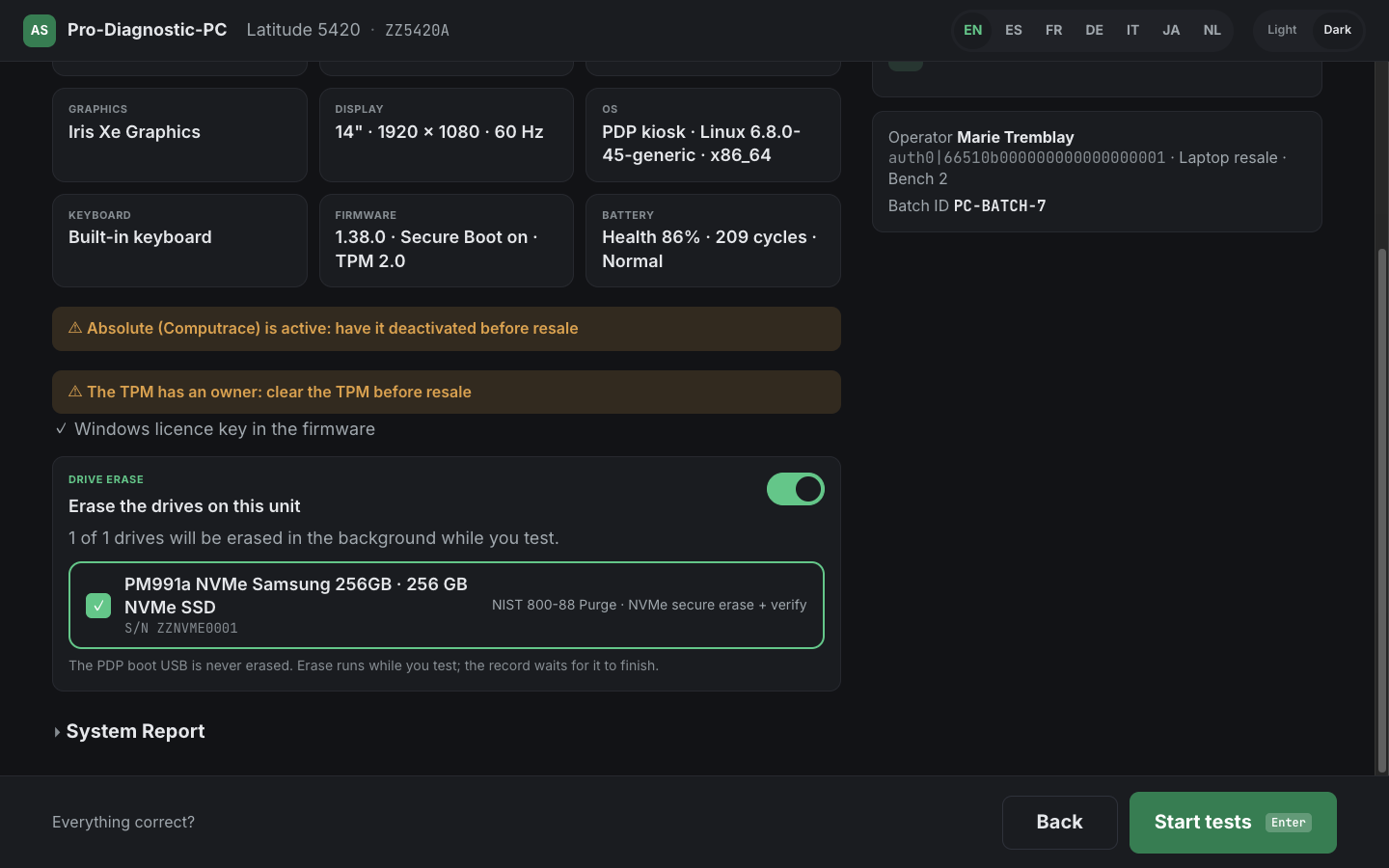
A method chosen per drive, named on screen with its serial.
NVMe secure erase, ATA sanitize or a PRNG overwrite — selected by what the drive actually supports, mapped to NIST 800-88 Purge or Clear, and shown against that drive's serial number before anything is written.
An erase that cannot be tied to a serial number is refused outright — an erase with no machine attached is no evidence.
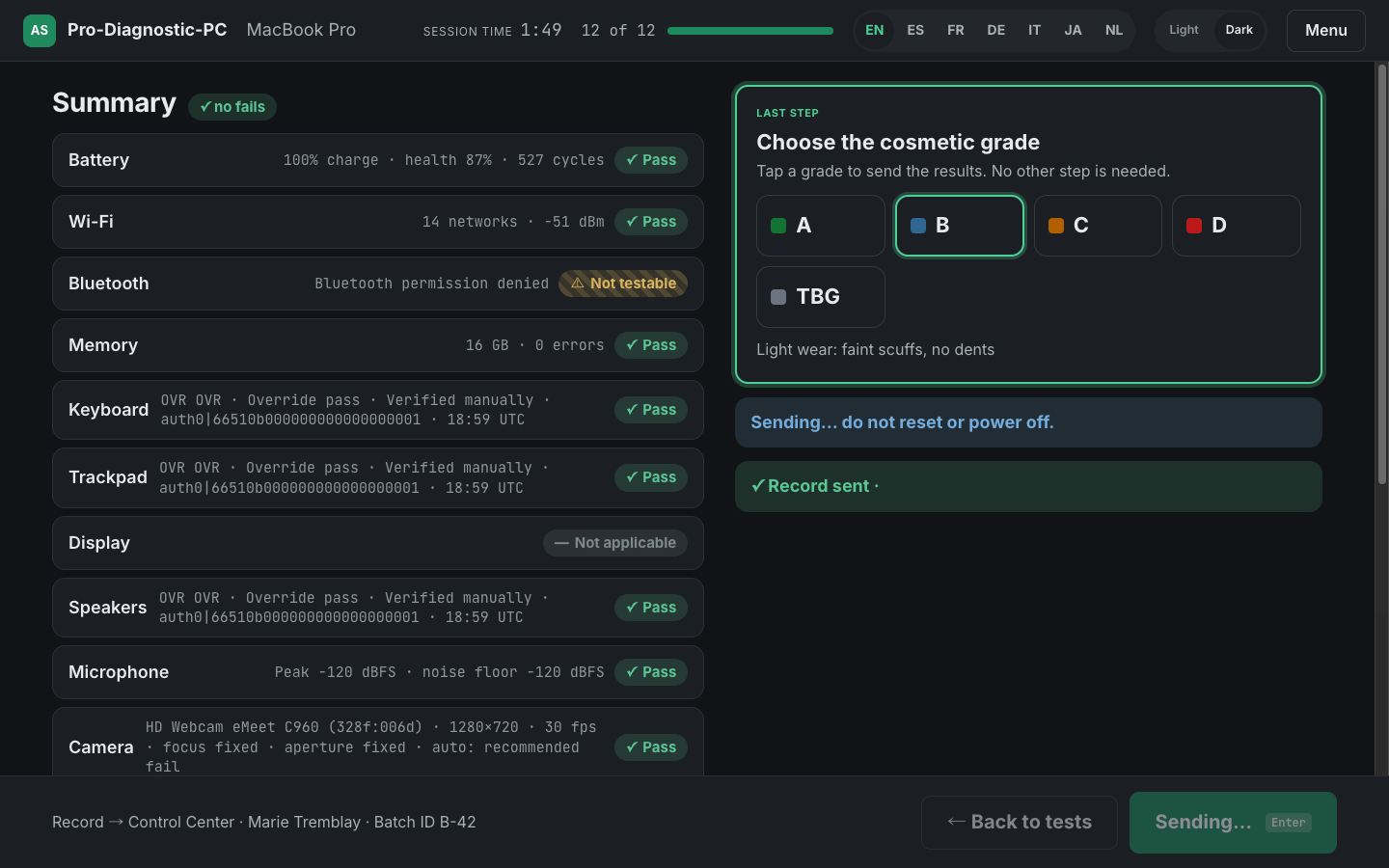
Your grading scale, audited as it runs.
Cosmetic grades against your own scale, not ours. Operator audits mix staged tests into real work at a ratio you set per operator, so a new hire is checked more often than a proven one.
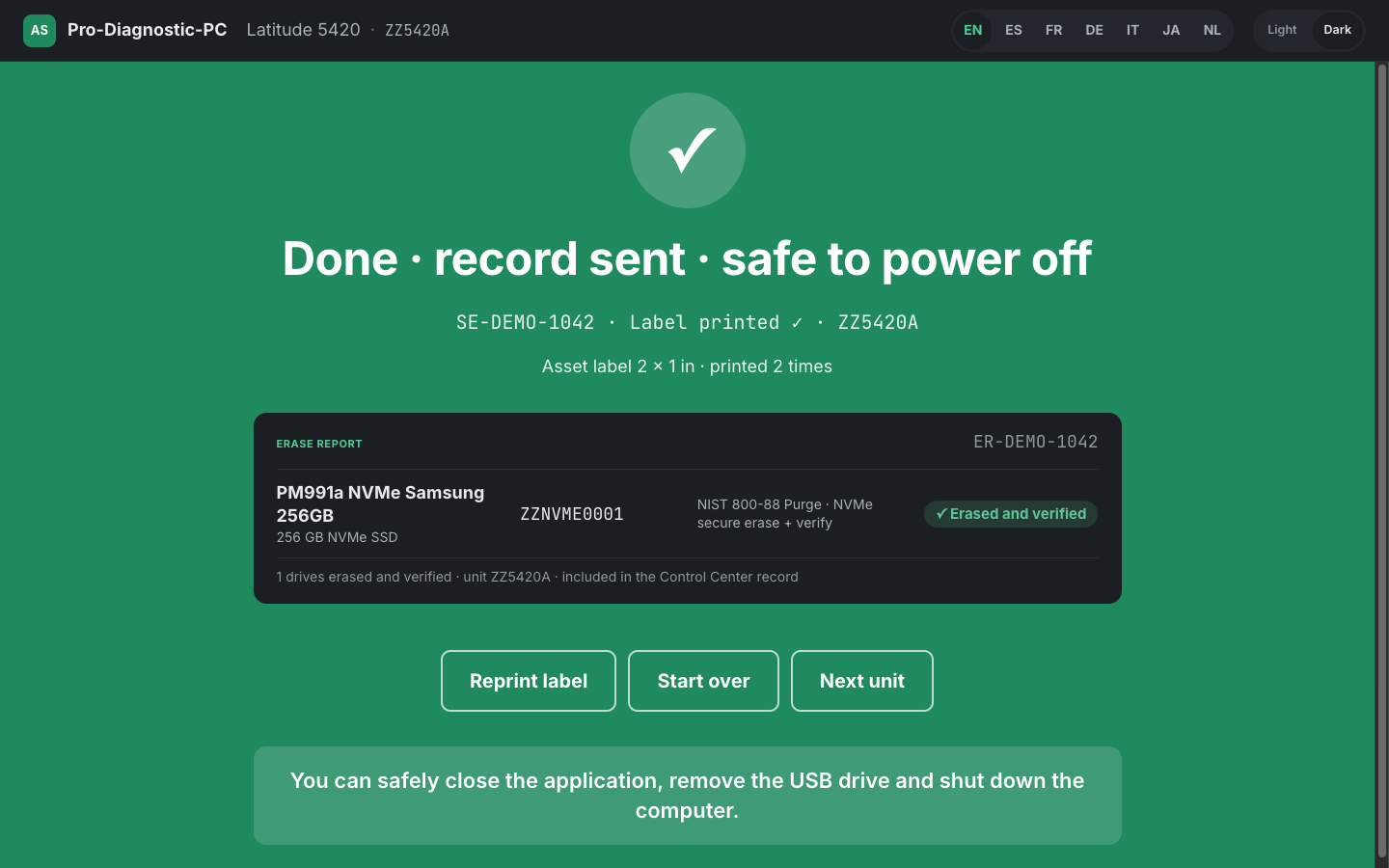
Record sent, label printed, safe to power off.
The erase report lists every drive, its serial, its method and its verification result. The asset label prints at the bench. The device record lands in Control Center. The operator is told, in plain words, that they are done.
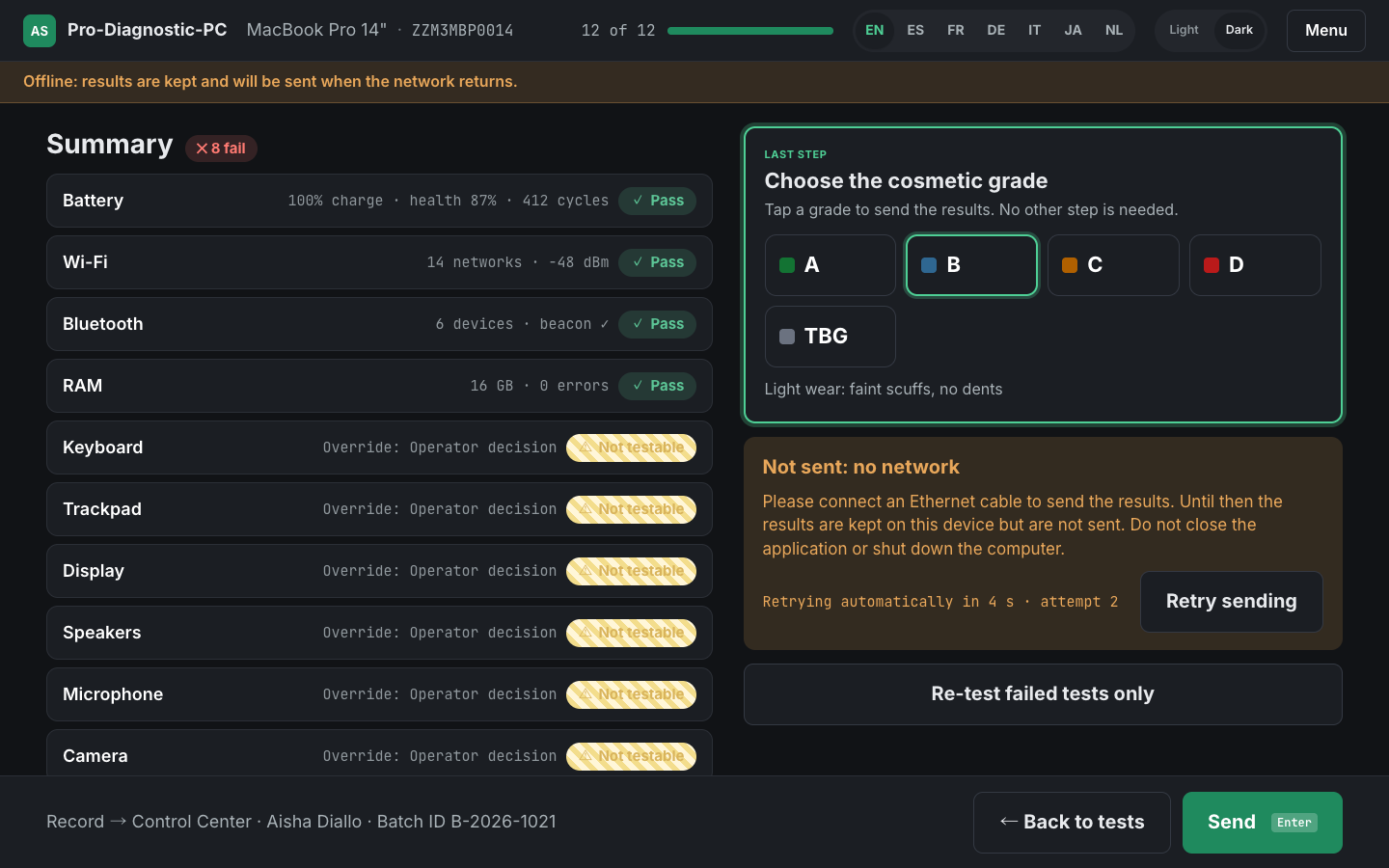
Nothing is lost when the link drops.
Records are written to disk before they are sent and deleted only once the platform confirms receipt, retrying every five seconds. A station that loses its network keeps working and catches up afterwards.
Screens show synthetic operators, batches and serial numbers.
Phones, tablets, Macs and PCs — diagnosed from the same bench.
Most platforms in this category do mobile and stop. Running computers and phones through one workflow, one record and one report is the difference between a tool and an operating platform.
| Platform | Product | State | Depth | Coverage | Erasure | ADISA AAL 4 |
|---|---|---|---|---|---|---|
| iOS & iPadOS | Pro-Diagnostic Desktop | Available | 83 tests | 90 models · 4,500 variants | Reset to factory, verified | Certified |
| Android | Pro-Diagnostic Desktop | Available | 133 tests | 7,000+ models | Verified erasure | Certified |
| macOS | Mac Restore | Available | Flash, restore, erase | Apple silicon and Intel | Verified erasure | Certified |
| Mac — diagnostics | Pro-Diagnostic PC & Mac | Available | Guided + automatic suite | Any Mac on macOS 13+ | Handled by Mac Restore | — |
| Windows PC | Pro-Diagnostic PC & Mac | Available | Guided + automatic suite | Dell · HP · Lenovo · ASUS | Every internal drive, verified | — |
| Apple Watch | Receiving module | Limited | Receiving | Up to Series 6 | Not supported | — |
iOS & iPadOS
AvailableADISA AAL 4- Pro-Diagnostic Desktop
- 83 tests
- 90 models · 4,500 variants
- Reset to factory, verified
Android
AvailableADISA AAL 4- Pro-Diagnostic Desktop
- 133 tests
- 7,000+ models
- Verified erasure
macOS
AvailableADISA AAL 4- Mac Restore
- Flash, restore, erase
- Apple silicon and Intel
- Verified erasure
Mac — diagnostics
Available- Pro-Diagnostic PC & Mac
- Guided + automatic suite
- Any Mac on macOS 13+
- Handled by Mac Restore
Windows PC
Available- Pro-Diagnostic PC & Mac
- Guided + automatic suite
- Dell · HP · Lenovo · ASUS
- Every internal drive, verified
Apple Watch
Limited- Receiving module
- Receiving
- Up to Series 6
- Not supported
ADISA assurance level 4 certification covers Pro-Diagnostics and MacRestore. No certificate covers Pro-Diagnostic PC, so no certified-erasure claim is made for computers.
Chromebook and ChromeOS are not supported and are not on this table. Apple Watch beyond Series 6 is built and ready to activate.
We sell no hardware, and that is the point.
This platform is software that drives equipment you can buy from anybody. There is no robot, no rig, no fixture and no Asset Science-branded box to depreciate — and nothing on your floor that only we can replace.
The alternative in this category is a capital purchase: robotic cells and proprietary rigs, bought up front, amortised over years, and replaced on the vendor’s schedule rather than yours.
A bench here is a commodity PC, a scanner and a label printer. If one dies on a Tuesday, you replace it on Tuesday.
The bench PC
Dell, HP, Lenovo or ASUS. UEFI with Secure Boot on.
Nothing is installed on the machine under test. It boots our read-only USB system, reaches a working test station in under 90 seconds, and its own operating system never starts.
The Mac
macOS 13 or later. Universal, signed and notarized.
Runs natively on Apple silicon. A Mac is never erased by the diagnostic app — Mac Restore handles the wipe, and it holds its own certificate.
Barcode scanner
Any USB keyboard-wedge scanner.
No driver, no brand lock, no model list. The scanner types the code and presses Enter. Typing or pasting an identifier works exactly as well, which matters when a label is damaged.
Label printer
Commodity Zebra desktop units. Network, CUPS or direct to file.
The reference bench prints a 2 × 1 inch asset label on a Zebra ZD421 over the network. Nothing about the platform requires that specific printer.
Cables and ports
USB-C, Lightning, Micro-USB. Wired only.
Devices connect over USB. Bluetooth connection is not supported, which is a deliberate reliability choice rather than a gap — a dropped radio link mid-erase is not an acceptable failure mode.
Power
Mains for long erases.
Below 25% battery the bench refuses to start an erase until the charger is connected. A long overwrite that dies halfway produces a device nobody can account for.
The record leaves the building as easily as it arrives.
A diagnostic result that is trapped in a vendor dashboard is worth very little. Everything the floor produces is available by API, by export and by scheduled report, on every plan.
REST API
Uniform resource endpoints across eleven services, authenticated with a bearer token validated against our identity provider.
- Licence keys scoped three ways — whole tenant, a single facility, or a single deployment
- The same device record the floor writes, available the moment it lands
- Documentation available on request
GSMA Device Check
Blacklist and greylist status, with the full IMEI history behind it — action, date, reporting carrier, country and reason code.
- A free test mode returns a fixed payload, so you can validate an integration end to end before a single billed call
- Cache hits never reach GSMA and are billed at a reduced rate
- Enable or disable checking per service suite, with usage, cache-versus-billable split and response times in Control Center
Reporting & export
Every grid exports what is on screen, as CSV or Excel. No feature gate, no plan tier, no export fee.
- Scheduled reports emailed daily, weekdays, or on the 1st and 15th
- Bulk device lookup from a CSV of up to 30,000 identifiers
- Failed scans export separately as a worklist for investigation
MDM
Apple Business Manager enrolment handled as a lifecycle rather than a one-off action.
- Per-device outcome of passed, failed or incomplete — not a binary that hides the middle case
- Bulk unenrolment, with a per-device countdown before it takes effect
- A 180-day history of wiped devices that survives deletion of the device itself
On-device routing
The bench reacts to what happens during a run, without a round trip to anybody's integration layer.
- Five events — device connected, service started, service completed, process completed, manual failure
- Five responses — call your API, run an application, print a label, set custom fields, or skip a service
- Fail-fast configurable per suite and per fail code
Public certification
A verifiable device record your buyer can check themselves, without an account and without asking you.
- Seven status tiles: activation, Find My iPhone, GSMA blacklist, MDM, eSIM, factory reset and parts check
- Green means the check ran and passed. Red means it ran and failed. Amber means it did not run — which is not the same as a failure, and we say so
- Parts check compares each component serial against the factory serial and flags anything not OEM
What we deliberately do not list
Marketplace publishing, CRM connectors and outbound webhooks are on the roadmap and are not built, so they are not on this page. We would rather you find that out here than three weeks into an evaluation.
The industry charges per device. We don't.
Under per-device pricing, every unit you process costs the same as the last one — so growth never earns you anything. Under flat or tiered licensing, the marginal cost of the next device approaches zero.
- No per-device fees
- No minimum volume
- No proprietary hardware
- No multi-year lock-in
- Core platform at every band
- CSV and API export included
Illustrative shape, not a quotation. Pricing is structured around your volume and the motion that suits you — prepay packs, a per-workstation plan, or an enterprise commitment.
Put it on a bench and see.
Run your own devices through it, on your own floor, against your own grading scale. No credit card, and no sales call before you start.